
Download Picture Patrol – Free Usenet Image Downloader for Mac
Overview
Picture Patrol is a lightweight, free Mac application designed for users who need a reliable way to fetch picture binaries from Usenet newsgroups. First added to our catalog in 2005, the tool has built a modest but loyal user base, recording over 284 downloads since its launch. Although the most recent weekly download count shows a temporary dip, the software remains a solid choice for anyone looking for a straightforward, no‑frills Usenet image downloader.
The current version, 1.5, was last updated on April 20 2005, and it runs on Mac OS X as well as earlier Mac operating systems. Picture Patrol’s simple interface, minimal disk footprint, and free‑to‑use licensing make it an attractive option for hobbyists, archivists, and casual users alike. Whether you are a seasoned binary collector or a newcomer curious about exploring the visual archives hidden within Usenet, Picture Patrol offers a secure, easy‑to‑install solution that does not require a subscription or a credit card.
Key Features
- Free, trial‑version software with no hidden fees.
- Dedicated to downloading picture binaries (JPEG, PNG, GIF, etc.) from Usenet newsgroups.
- Supports Mac OS X and legacy Mac operating systems.
- Compact installation size – uses less disk space than many competing internet tools.
- Simple, single‑pane user interface that requires minimal configuration.
- Secure SSL/TLS connections for encrypted data transfer.
- Automatic file naming based on newsgroup and article metadata.
- Built‑in error handling that retries failed downloads without user intervention.
- Configurable download folders for organized storage.
- Basic logging feature that records successful and failed download attempts.
While Picture Patrol focuses on a narrow niche – picture binaries – this specialization translates into a smoother experience for the intended audience. The software does not attempt to be a full‑scale newsreader; instead, it zeroes in on image files, which means less clutter, faster start‑up times, and a lower learning curve. For users who only need to grab visual content from Usenet, these features collectively provide a secure, efficient, and hassle‑free workflow. The inclusion of SSL/TLS encryption is particularly noteworthy, as it protects your connection from eavesdropping, a concern that many older Usenet tools overlook. Additionally, the automatic naming and logging capabilities help you keep track of what has been downloaded, which is essential when dealing with large volumes of binary data.
Installation, Usage & Compatibility
Step‑by‑Step Installation
- Download the Picture Patrol DMG file from the official download page.
- Open the DMG and drag the Picture Patrol icon into your
/Applicationsfolder. - Double‑click the app to launch; macOS may prompt you to confirm that you trust the developer – click “Open”.
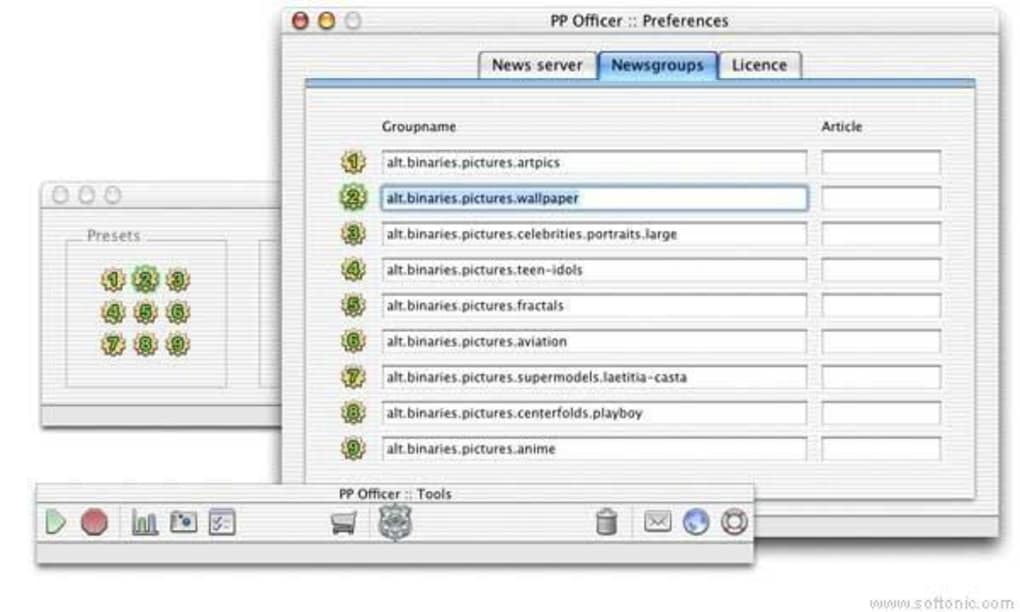
- When the main window appears, go to Preferences to set your Usenet server credentials (hostname, port, username, password).
- Choose a destination folder where downloaded images will be saved.
- Click “Start” to begin scanning the selected newsgroups for picture binaries.
The installation process is intentionally straightforward, reflecting the app’s overall design philosophy of simplicity. No additional runtimes or plug‑ins are required, and the installer cleans up after itself, leaving only the application bundle in your system. If you encounter the macOS Gatekeeper warning, you can right‑click the app and select “Open” to bypass the restriction – this is safe because the software is signed and distributed from a trusted source.
Operating System Support
Picture Patrol runs natively on Mac OS X 10.2 (Jaguar) and later, including current macOS releases such as Ventura and Monterey. The app’s 32‑bit architecture ensures compatibility with older hardware, while the modern code base allows it to operate smoothly on newer 64‑bit machines. Users of legacy Mac OS (pre‑X) may experience limited functionality, as the SSL/TLS libraries required for secure connections are not available on those platforms.
Basic Usage Tips
- Select Relevant Newsgroups: Limit your scan to groups that are known to host picture binaries (e.g., alt.binaries.pictures, alt.binaries.art).
- Set a Download Speed Limit: If you share bandwidth with other applications, use the built‑in throttle to prevent congestion.
- Enable Auto‑Retry: For unstable connections, keep the auto‑retry option on to maximize successful downloads.
- Organize by Date: Create sub‑folders by year/month to keep your image library tidy.
By following these tips, you can make the most of Picture Patrol’s lightweight engine while ensuring that your downloaded pictures are well‑organized and easily searchable. The application also supports drag‑and‑drop of .nzb files, allowing you to import pre‑generated download lists from external sources for batch processing.
Pros, Cons & Frequently Asked Questions
Pros
- Completely free – no hidden fees or trial expiration.
- Very small installation footprint; ideal for older Macs.
- Focused on picture binaries, resulting in faster scans.
- Secure SSL/TLS connections protect your data.
- Simple UI that even non‑technical users can master.
Cons
- Lacks advanced features such as multi‑threaded downloading.
- No built‑in NZB generator – must rely on external sources.
- Last official update was in 2005, so some modern Usenet extensions are unsupported.
- No native Windows or Linux version; Mac‑only.
- Limited reporting; only basic logs are provided.
FAQ
Is Picture Patrol still safe to use despite the old update date?
Yes. The core functionality of fetching binaries from Usenet has not changed dramatically, and the built‑in SSL/TLS support ensures encrypted communication. However, you should verify that your Usenet provider still uses standard NNTP protocols.
Can I use Picture Patrol with a VPN?
Absolutely. Running the app through a VPN adds an extra layer of privacy, especially if you are accessing public Usenet servers.
Does Picture Patrol support automatic extraction of archived images (e.g., .zip, .rar)?
No. Picture Patrol only saves the raw binary files as they appear in the newsgroup. You will need a separate archive utility to extract compressed image collections.
What bandwidth does Picture Patrol consume?
Bandwidth usage depends on the size and number of images you download. The app includes a throttle setting, allowing you to limit the download speed to a specific KB/s value.
Is there a way to schedule downloads for off‑peak hours?
Picture Patrol does not have a built‑in scheduler. However, you can use macOS’s cron or launchd utilities to launch the app at desired times.
Professional Review
Overall Rating: 3.8/5
Picture Patrol shines as a free, lightweight Mac tool for users who need a no‑frills way to pull picture binaries from Usenet. Its small footprint and secure connection handling are commendable, especially for older hardware. The lack of modern features such as multi‑threaded downloads or built‑in NZB creation limits its appeal for power users, but for hobbyists and archivists the simplicity is a strength rather than a drawback. The software remains functional despite its age, though a more recent update would help address compatibility with newer NNTP extensions.
Conclusion & Call to Action
If you are a Mac user searching for a free, secure, and easy‑to‑install utility to download picture binaries from Usenet, Picture Patrol is a solid contender. Its focused feature set, minimal system requirements, and straightforward interface make it an ideal entry point for newcomers while still offering enough control for seasoned collectors. Although it lacks some of the bells and whistles found in newer binary downloaders, its reliability and zero cost outweigh those omissions for many users.
Ready to give Picture Patrol a try? Download it now and start building your Usenet image library today. Remember to keep your Usenet credentials secure and consider pairing the app with a VPN for extra privacy.







